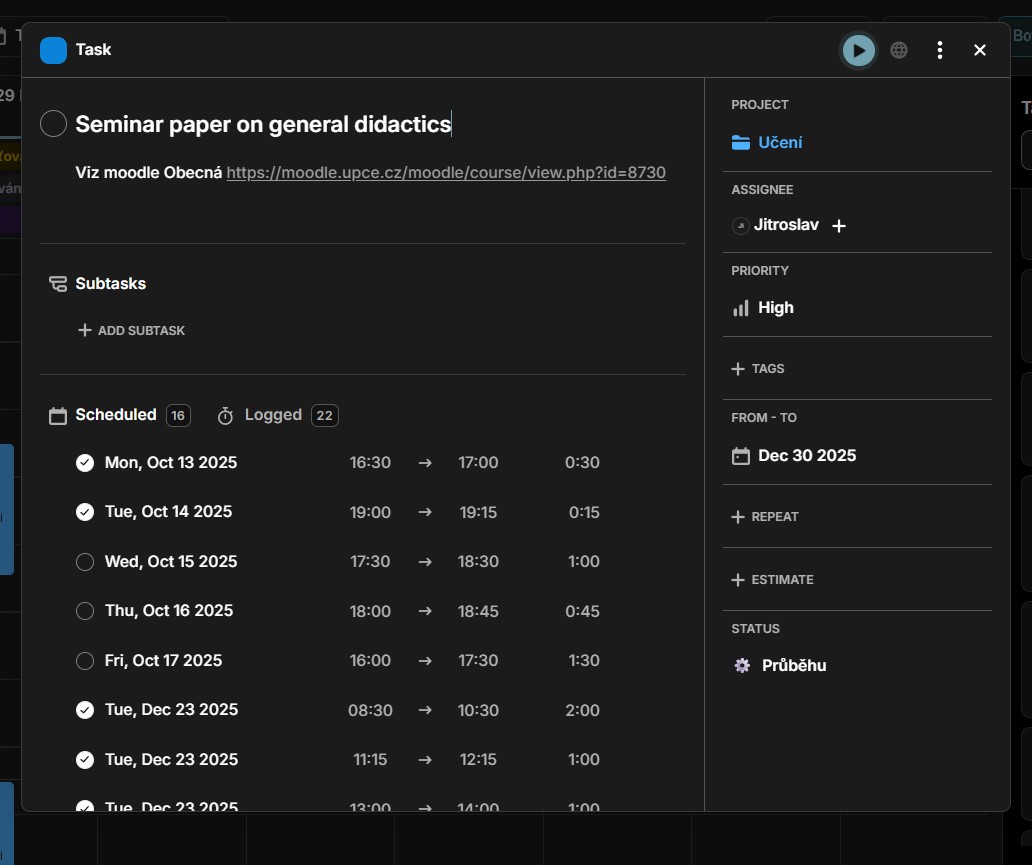
After an update that separated individual task display to “simplified and “with details,” scrolling through the task window got broken (as showed in the image of “seminar paper” task). In the simplified view, which opens when you click on the task in the my time view, scrolling is working. However, when you open “task details” scrolling is no longer possible (not even when you open it through the task view). Because of this, I cannot view my notes when there is too many scheduled or logged hours (as I cannot scroll past the hours.)
The second problem: I cannot search few tasks I created few weeks ago (in this example task called “exams”). This applies for the task bar in calendar/my time view (picture with “exa”) and adding it as a new task (auto-fill does not show me this task, I can only create a new task.) Nonetheless, I can find the task in the task or board views. However, when I create a new task now (1st of January 2026), it does not demonstrate this bug. I believe that it might have been a bug for every newly created task in a certain period in the last few weeks. So any task created in this period remained permanently bugged and unsearchable in the my time view.